#  PlanarianScanner
> Automated imaging system for behavioral tracking of planarians
> (C) dd@linuxtarn.org for the Biology Laboratory, Champollion University, Albi
---
## Overview
**PlanarianScanner** is a web application developed for monitoring the activity
and movements of **planarians** (*Platyhelminthes*) in laboratory research.
The system controls a motorized multi-well scanner composed of a CNC arm (GRBL)
and a high-definition ArduCam camera mounted on a Raspberry Pi 4. It enables
automated image acquisition on a **6×4 wells × 4 plates** grid,
high-performance storage of captures, and export to remote analysis machines.
---
## Hardware
| Component | Details |
|---|---|
| Board | Raspberry Pi 4 |
| Camera | High-definition ArduCam |
| Motion system | CNC arm (L2544) controlled by GRBL |
| Well grid | 6×4 × 4 multi-well plates |
| Network | Local LAN — Samba/rsync export |
---
## Technical Stack
| Layer | Technology |
|---|---|
| Backend | Django + Django Channels |
| Real-time | Redis (broker + channel layer) |
| Acquisition | OpenCV + Picamera2 |
| Storage | ReductStore (high-performance time series) |
| Asynchronous tasks | Celery + django-celery-beat |
| Export | Samba (CIFS), rsync/SSH |
| Platform | Raspberry Pi 4 — Debian Linux |
---
## Features
### Application 1: Test Tube Scanner
- CNC arm control through GRBL — automatic well-by-well movement
- Multi-well calibration with database synchronization
- Three capture modes:
- **ArduCam** (Picamera2) — high-definition camera mounted on the arm
- **Webcam** — via OpenCV (development / testing)
- **Plate video** (`VideoPlateCapture`) — dynamic crop from a full-plate video replayed in loop; suitable for scans without an embedded camera
- Assisted calibration:
- Automatic well-center detection (Hough + CLAHE, adjustable radius range per mode)
- Green Canny overlay to visualize well borders under difficult lighting
- Real-time controls: Debug, Annotation Overlay, Edge Enhance, Crop
- Frame storage in ReductStore time-series database
- Configurable scan sessions (full grid or selected wells)
- Asynchronous export (Celery):
- ZIP archive of JPEG images per session
- MP4 video generated from captured frames
- Automatic transfer of exports to remote machines (Linux / Windows)
- Nightly export scheduling via django-celery-beat
- Real-time web interface (Django Channels / WebSocket)
- Django administration interface (sqlite3 or mariadb or postgresql)
- Long-task progress tracking through polling
### Application 2: Planarian Detection and Multi-Individual Tracking in a Tube
[🎬 Planarian Simulation Video](https://youtu.be/pkzClmBp_KM)
- Supports multiple planarians with configurable parameters via Django or CSV.
- Strategy:
- MOG2 background subtraction (lightweight on Raspberry Pi 4)
- Detection of all valid contours (surface >= min_area_px)
- Frame-to-frame association using minimum Euclidean distance
via the Hungarian algorithm (scipy.optimize.linear_sum_assignment)
- Independent inter-frame state per individual (PlanarianState)
- Returns a list of results, one for each tracked individual
- Per-planarian CSV export compatible with EthoVision XT.
- Metrics per frame:
- Mobility : velocity, distance, moving, mobility_state
- Thigmo : dist_to_wall_mm, near_wall
- Photo : dist_to_light_mm, heading_to_light_deg, fleeing_light
- Chemo : dist_to_food_mm, heading_to_food_deg, approaching_food, in_food_zone
- Social : nearest_neighbour_mm, in_avoid_zone, in_aggreg_zone, chem_repulsion_level
- Summary metrics:
- Mobility : movedCenter_pointTotal_mm, velocity_mean_mm_s, state durations
- Thigmo : thigmotaxis_pct_time_near_wall
- Photo : photo_pct_time_fleeing, photo_mean_dist_mm, photo_latency_s
- Chemo : chemo_pct_time_approaching, chemo_pct_time_in_zone,
chemo_latency_s, chemo_mean_dist_mm
- Social : social_pct_time_avoiding, social_pct_time_aggregating,
social_mean_nn_mm, social_contact_events
- Default EthoVision thresholds (configurable via Django or CSV)
- **Immobile** : movement < 0.2 mm/s
- **Mobile** : 0.2 to 1.5 mm/s
- **Highly mobile** : > 1.5 mm/s
| EthoVision | CSV frames | CSV summary |
|---|---|---|
| movedCenter-pointTotalmm | total_distance_mm | movedCenter_pointTotal_mm |
| VelocityCenter-pointMeanmm/s | velocity_mm_s | velocity_mean_mm_s |
| MovementMoving | moving, duration_moving_s | movement_moving_duration_s |
| MovementNot Moving | duration_stopped_s | movement_not_moving_duration_s |
| ImmobileFrequency / Duration | mobility_state | mobility_immobile_frequency/duration_s |
| MobileFrequency / Duration | mobility_state | mobility_mobile_frequency/duration_s |
| Highly mobileFrequency / Duration | mobility_state | mobility_highly_mobile_frequency/duration_s |
- Behaviors
- **Thigmotaxis** : wall attraction (--thigmotaxis)
- **Phototaxis** : fleeing from light (--photo-mode, --photo-strength)
- **Chemotaxis** : attraction toward a food source (--chemo-strength)
- **Inter-individuals** : contact avoidance, aggregation, chemical repulsion
### Application 4: Planarian Simulation
- planarian_sim.py
Circular space of 16 mm diameter, 500x500 px
Supports multiple planarians with configurable parameters via CLI arguments.
Per-planarian CSV export compatible with EthoVision XT.
Simulated behaviors:
- Thigmotaxis : wall attraction (--thigmotaxis)
- Phototaxis : fleeing from light (--photo-mode, --photo-strength)
- Chemotaxis : attraction toward a food source (--chemo-strength)
- Inter-individual : contact avoidance, aggregation, chemical repulsion
Usage:
python3 planarian_sim.py [options]
Examples:
python3 planarian_sim.py --count 5 --thigmotaxis 0.4
python3 planarian_sim.py --count 5 --photo-mode fixed --photo-x 0.2 --photo-y 0.2 --photo-strength 0.6
python3 planarian_sim.py --count 5 --chemo-x 0.7 --chemo-y 0.5 --chemo-strength 0.5
python3 planarian_sim.py --count 5 --avoid-strength 0.6 --aggreg-strength 0.2
- make_videos.sh
- Configurable video generator
Usage:
- ./make_video.sh (generates the default file)
- ./make_video.sh all (generates 24 videos for 24 test tubes)
---
## Architecture
```text
Raspberry Pi 4
├── Django (web interface + API)
│ ├── Django Channels ←→ Redis (real-time WebSocket)
│ └── Celery workers
│ ├── scanning(session_id) — well traversal
│ ├── export_images_zip() — JPEG ZIP generation
│ ├── export_video_mp4() — MP4 generation (OpenCV)
│ └── transfer → /mnt/exports — Samba share
│
├── ArduCam ← Picamera2 / OpenCV — HD capture
├── CNC GRBL ← Serial — XY movement
└── ReductStore — frame time-series storage
Installation
Full documentation coming soon.
Using piImager, install Raspberry Pi OS 64-bit Trixie on the Raspberry Pi 4.
Customize your Raspberry Pi with at least SSH enabled (SSH key or password).
Later, for convenience, you may install a VNC server.
ssh rpi4@ip.of.raspi
git clone https://github.com/your-repo/planarianscanner.git
git@github.com:deunix-educ/PlanarianScanner.git
# modify environment variables if needed
cp .env.example .env
# Edit .env : SECRET_KEY, REDIS_URL, REDUCTSTORE_URL, ...
cd PlanarianScanner/etc
chmod +x *.sh
# install system libraries
./1-install-sys.sh
# compile reductstore (~15 min on Raspberry Pi 4)
./2-cargo-reductstore-install.sh
# install samba client
./3-install-samba-client.sh
# install mariadb
./4-install_mariadb.sh
# install adminer
./5-install_adminer.sh
# Configure Django applications
./6-install_django_app.sh
# test
sudo supervisorctl stop test_tube:*
./manage.py runserver 0.0.0.0:8000
# local test
# http://127.0.0.1:8000
# remote test
# http://ip.of.raspi:8000
# end of test
sudo supervisorctl restart test_tube:*
Starting services:
All services are accessible through supervisor
http://root:toor@ip-of-raspi:9001
or
sudo supervisorctl start|stop|restart reductstore
sudo supervisorctl start|stop|restart test_tube:*
Repository Organization
PlanarianScanner/
├── assets
│ ├── calibration-auto.png
│ └── logo.png
├── browser.py
├── etc
│ ├── 1-install-sys.sh
│ ├── 2-cargo-reductstore-install.sh
│ ├── 3-install-samba-client.sh
│ ├── 4-install_mariadb.sh
│ ├── 5-install_adminer.sh
│ ├── 6-install_django_app.sh
│ ├── db
│ │ ├── configuration.json
│ │ ├── multiwell.json
│ │ └── well.json
│ ├── install-linux-samba-server.sh
│ ├── nginx_service.conf
│ ├── reductstore_service.conf
│ ├── requirements.txt
│ ├── scanner_service.conf
│ └── supervisor-inet_http.conf
├── LICENSE
├── README.md
└── test_tube_scanner
├── home
│ ├── apps.py
│ ├── asgi.py
│ ├── celerymodule.py
│ ├── context_processors.py
│ ├── __init__.py
│ ├── locale
│ ├── management
│ ├── middleware.py
│ ├── __pycache__
│ ├── settings.py
│ ├── static
│ ├── templates
│ ├── templatetags
│ ├── urls.py
│ ├── views.py
│ └── wsgi.py
├── logs
│ ├── celery.log
│ └── test_tube.log
├── manage.py
├── media
│ ├── images
│ └── simulation
├── modules
│ ├── capture_interface.py
│ ├── circular_crop.py
│ ├── grbl.py
│ ├── __init__.py
│ ├── picamera2_capture_basic.py
│ ├── picamera2_capture.py
│ ├── planarian_metrics.py
│ ├── planarian_tracker.py
│ ├── __pycache__
│ ├── reductstore.py
│ ├── system_stats.py
│ ├── tube_aligner.py
│ ├── utils.py
│ ├── videofile_capture.py
│ └── webcam_capture.py
├── planarian
│ ├── admin.py
│ ├── apps.py
│ ├── forms.py
│ ├── __init__.py
│ ├── migrations
│ ├── models.py
│ ├── __pycache__
│ ├── templates
│ ├── tests.py
│ ├── urls.py
│ └── views.py
├── run-workers.sh
├── scanner
│ ├── admin.py
│ ├── apps.py
│ ├── constants.py
│ ├── consumers.py
│ ├── export_tasks.py
│ ├── __init__.py
│ ├── migrations
│ ├── models.py
│ ├── multiwell.py
│ ├── process.py
│ ├── __pycache__
│ ├── routing.py
│ ├── static
│ ├── tasks.py
│ ├── templates
│ ├── templatetags
│ ├── tests.py
│ ├── urls.py
│ └── views.py
├── staticfiles
│ ├── admin
│ ├── css
│ ├── img
│ ├── js
│ ├── scanner
│ └── webfonts
└── templates
└── admin
## Calibration Procedure
### Camera mode (ArduCam / Webcam)
1. **Debug** → enables continuous HoughCircles detection (circle + zones displayed)
2. **Overlay** → shows/hides annotations without stopping detection
3. **Crop** → isolates the well and navigates to the Base position
4. **Auto calibration** → automatic well-by-well centering with position save
### Plate video mode
> **Note**: this mode lets you drive the scanner without a camera mounted on the CNC arm.
> A single recording of the full plate is made once and replayed in a loop; each GRBL move
> dynamically crops the current well's region from that video. Ideal for hardware-free
> testing or labs without an ArduCam.
1. Create a `VideoPlate` record in admin (upload video, set `px_per_mm`, `x_origin_mm`, `y_origin_mm`)
2. **Edge Enhance** → green Canny overlay to locate well borders under variable lighting
3. **Debug** → Hough detection with wider radius range (well fills the crop)
4. **Crop** → activates circular crop + moves to Base position
5. Navigate well by well and save positions
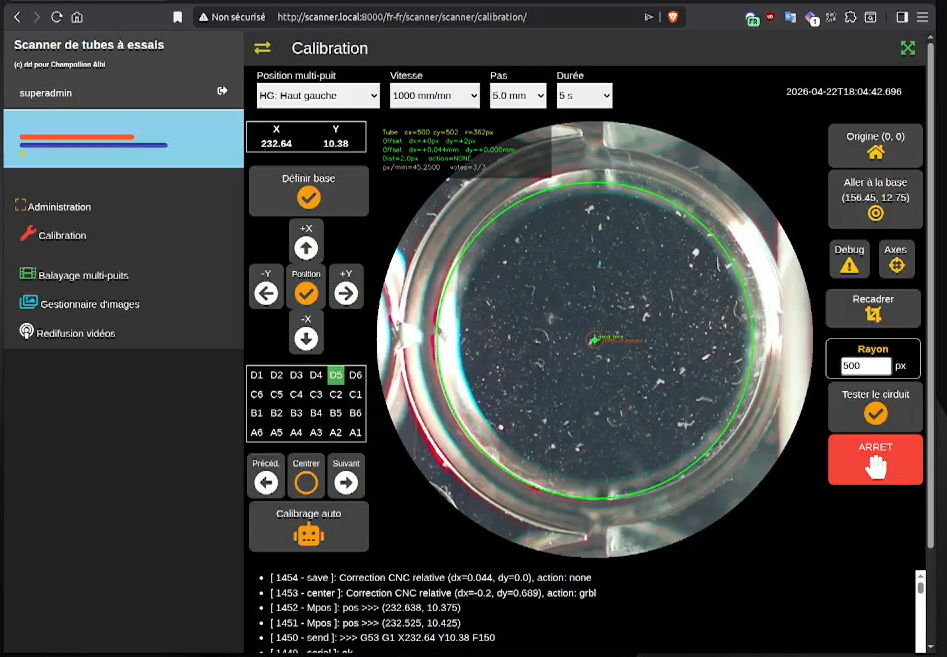
[🎬 Auto Calibration Video](https://youtu.be/6RueJ3onUoY)
## Status




---
## License
GPL-3.0 — Open-source project, developed for sharing and scientific reproducibility.